
Menu
User Management
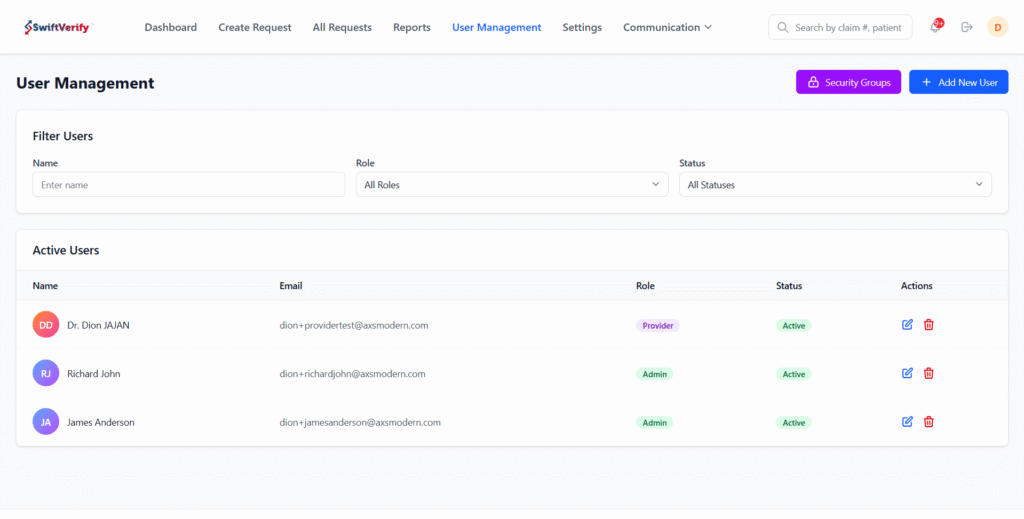
Manage users within your organization with centralized access controls. Add and edit users, deactivate accounts, and assign roles through security groups to ensure secure and appropriate access to the platform.
View Users
Providers can view all users in a centralized table and filter by user name, role (security group), or status (Active or Inactive).
Manage Users
Providers can add new users, edit existing user profiles, and deactivate users as needed to manage access within their organization.
https://axstest.com/wp-content/uploads/2026/01/Manage-Users-2.mp4
Security Groups
Providers can create custom security groups and assign users to them. Each security group can be configured with specific permissions, ensuring controlled and secure access to system features.
https://axstest.com/wp-content/uploads/2026/01/Security-Groups-1.mp4
Facebook
Instagram
X-twitter
Address
309 W. Washington St. Suite 500
Chicago, IL 60606
Useful Links
- Who We Are
- What We Offer
- Why RMSOA
- Get in Touch
News
- Press Release

